






What is this?
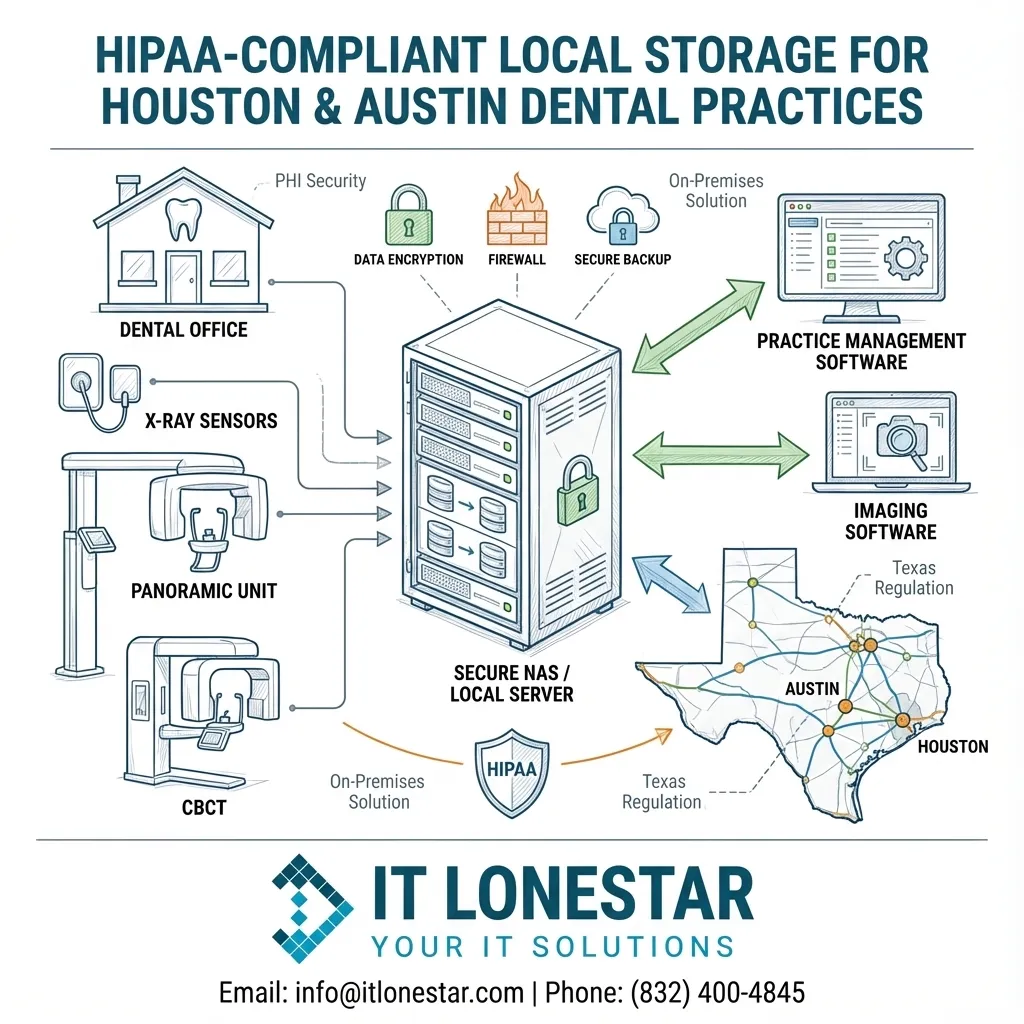
This question addresses how dental practices in Houston and Austin can securely store digital X‑rays and other Protected Health Information (PHI) using a NAS (Network Attached Storage) or a local server, while remaining fully HIPAA‑compliant with the help of IT LONESTAR.
In practical terms, it’s about designing and deploying an on‑premises storage solution—right inside your dental office—that safely holds images from sensors, panoramic units, and CBCT machines, and integrates with your practice management and imaging software. IT LONESTAR focuses on building, configuring, and maintaining this storage so your practice meets HIPAA, Texas regulations, and dental‑specific performance needs in the Houston and Austin areas.
Why this happens
Many dental offices in Houston and Austin grow from single‑provider setups into multi‑chair, multi‑location practices without updating their IT. Over time, X‑ray images and PHI end up scattered across workstations, old external drives, consumer‑grade NAS devices, or basic Windows file shares.
This leads to several problems:
1. HIPAA risk: Unencrypted drives, weak access control, and no audit trails can mean non‑compliance and exposure to fines.
2. Data loss risk: Single‑disk storage and aging hardware create a high chance of losing years of X‑rays and records.
3. Slow performance: Inadequate hardware and poor network design cause delays when loading large CBCT scans or 3D images.
4. No disaster plan: Ransomware, theft, fire, or hardware failure can shut down operations if there is no tested backup and recovery strategy.
IT LONESTAR frequently sees these patterns during assessments in Austin and Houston dental clinics, which is why a properly planned NAS or local server solution is critical.
How we fix it
IT LONESTAR designs and deploys secure, HIPAA‑compliant dental X‑ray storage environments for practices across Houston and Austin, using either a business‑grade NAS or a dedicated local server—often in a hybrid configuration with encrypted cloud backup. Our approach typically includes:
1. Assessment & planning
- Inventory current sensors, pano/CBCT units, and imaging software (e.g., Dexis, Carestream, Dentrix, Eaglesoft).
- Estimate storage capacity and growth (3–5+ years).
- Evaluate your existing network (switches, cabling, Wi‑Fi, firewall) for imaging performance and security.
2. Choosing NAS vs. local server
- NAS solution: Ideal for small to mid‑size practices needing centralized image storage with lower cost and simpler management. IT LONESTAR deploys RAID‑based, redundant NAS devices with enterprise‑class drives and snapshots.
- Local server solution: Best for multi‑location or higher‑volume practices where imaging, practice management, Active Directory, and file services run together. We design virtualized servers with redundant power, RAID storage, and hardware monitoring.
- In many Houston and Austin practices, we combine both: a primary server plus a NAS for local backup or archival storage.
3. HIPAA‑centric configuration
- Full‑disk encryption for all PHI‑containing volumes.
- Role‑based access control (unique user logins, least‑privilege permissions).
- Enforced strong passwords and MFA where possible.
- Encrypted connections (SMB signing, TLS, secure VPN for remote access).
- Centralized logging and audit trails for access to PHI.
- Documented Business Associate Agreement (BAA) between your practice and IT LONESTAR.
4. Backup and disaster recovery (local + cloud)
- Automated image‑level backups from NAS or server to onsite backup storage.
- Offsite, HIPAA‑compliant encrypted cloud backups managed by IT LONESTAR.
- Regular backup verification and test restores.
- Ransomware‑resilient strategies (immutable backups, network segregation).
5. Security hardening and monitoring
- Next‑generation firewall with content filtering and intrusion prevention.
- Segmented network for imaging devices, guest Wi‑Fi, and administrative systems.
- Managed endpoint protection on all workstations and servers.
- 24/7 monitoring and patch management delivered by IT LONESTAR’s managed IT services in Houston and Austin.
6. Implementation with minimal downtime
- After‑hours or weekend cutover to the new NAS/server.
- Migration of existing X‑rays and PHI with integrity checks.
- Coordination with your imaging and practice management vendors.
- Staff training on proper use, access, and security best practices.
7. Ongoing compliance support
- Periodic risk assessments and documentation assistance for HIPAA.
- Policy and procedure guidance specific to dental imaging workflows.
- Rapid local support for clinics in Houston and Austin, including onsite visits when needed.
By partnering with IT LONESTAR, dental practices in Houston and Austin gain a robust, high‑performance storage platform for X‑rays and imaging—engineered for HIPAA, uptime, and future growth.