





What is this?
This is an educational article for dental practices in Houston and Austin that explains the most common cybersecurity mistakes clinics make—and how IT LONESTAR Solutions helps prevent them. It is designed for dentists, practice managers, and office administrators who rely on digital systems, EHR/EMR, imaging, and cloud platforms, and want to stay secure and compliant without becoming IT experts.
Why this happens
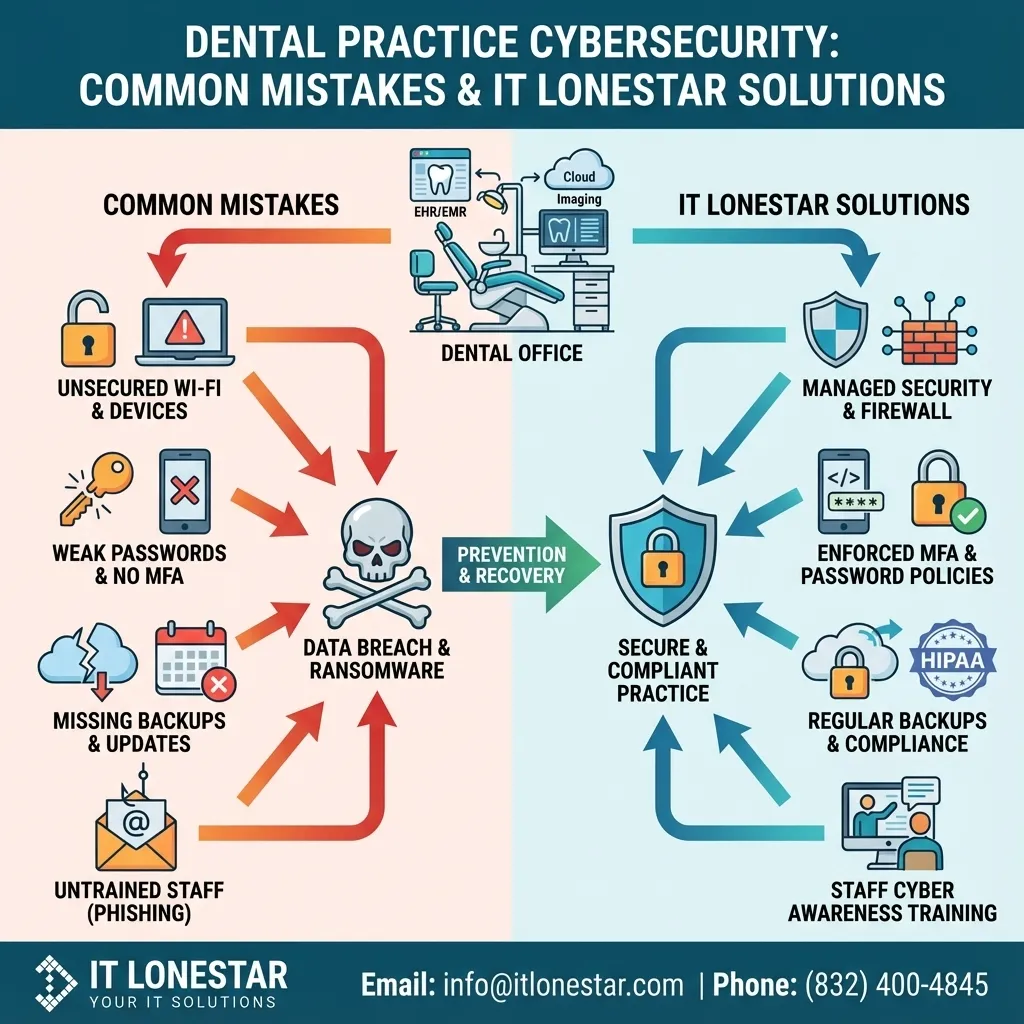
Many Houston and Austin dental clinics have rapidly adopted digital records, cloud-based practice management, online booking, and digital imaging—but their cybersecurity posture has not kept pace. They often rely on generic IT vendors, consumer-grade tools, or outdated in‑house setups. This creates several recurring problems:
1. Weak or reused passwords and no MFA – Staff frequently share logins to practice management, imaging, and email accounts, and multi‑factor authentication (MFA) is not enforced. One phished password can expose the entire clinic.
2. Unpatched systems and legacy software – Dental practices tend to keep operatory PCs, imaging workstations, and practice management systems running far past their secure lifecycle. Missing updates leave unpatched vulnerabilities that are easy for attackers to exploit.
3. No proper data backup and recovery – Many clinics believe external drives or basic cloud syncs are "backups." In reality, they lack tested, secure, and HIPAA‑aligned backups. When ransomware or hardware failure strikes, they discover they cannot restore charts, x‑rays, or schedules quickly.
4. Flat, insecure networks – Treatment room PCs, front desk machines, Wi‑Fi for guests, and even IoT devices share the same network. A single compromised device can become a launch point to reach servers and patient data.
5. Insufficient email and phishing protection – Dental teams are targeted with fake insurance requests, lab communications, and invoice emails. Without advanced filtering, security awareness training, and clear response procedures, staff may unknowingly click malicious links or open infected attachments.
6. Poor vendor and device management – Imaging vendors, labs, and third‑party billing providers often have remote access into systems. Without strict controls and logging, this widens the attack surface. Similarly, old PCs and drives are sometimes discarded without secure data destruction.
These issues persist because many dental practices in Austin and Houston lack a dedicated cybersecurity strategy, assume they are "too small" to be targeted, or believe standard antivirus is enough. That gap is exactly what IT LONESTAR Solutions is built to close for local dental clinics.
How we fix it
IT LONESTAR Solutions focuses specifically on securing healthcare and dental environments in Houston and Austin. For dental practices, we design cybersecurity around how your clinic actually operates—fast-paced, patient‑centric, and heavily regulated—while keeping day‑to‑day workflows smooth.
Here is how IT LONESTAR helps your Houston or Austin dental clinic avoid the most common cybersecurity mistakes:
1. Enforce strong identity, access, and MFA
- Implement centralized identity management so each team member has an individual, auditable account.
- Enforce strong password policies and MFA for practice management, email, and remote access—making stolen passwords far less useful to attackers.
- Set up role‑based access so assistants, hygienists, and front‑desk staff only see the data they need.
2. Proactive patching and device lifecycle management
- Keep Windows, macOS, practice management platforms, imaging systems, and third‑party apps patched and monitored through centralized tools.
- Identify unsupported systems (old PCs, servers, or OS versions) and plan secure upgrades or migrations with minimal downtime.
- Continuously monitor for missing security updates, especially on clinical workstations.
3. HIPAA‑aligned backup and rapid recovery
- Design a 3‑2‑1 backup strategy: three copies of data, on two different media types, with at least one copy off‑site.
- Protect practice management databases, imaging archives, file servers, and cloud workloads with encrypted backups.
- Regularly test restores so you know, not hope, that you can recover charts and images after ransomware, accidental deletion, or hardware failure.
4. Segmented and secure network architecture
- Separate guest Wi‑Fi, clinical equipment, admin systems, and servers into segmented networks. A compromised guest device can’t easily reach your PHI.
- Implement business‑grade firewalls with intrusion prevention, web filtering, and VPN for secure remote access.
- Map data flows between operatories, imaging, and front‑office systems to close unnecessary pathways.
5. Advanced email protection and staff training
- Deploy advanced email security to block phishing, malware, domain spoofing, and suspicious links before they hit inboxes.
- Run ongoing security awareness training tailored for dental teams—covering phishing red flags, safe handling of insurance and lab emails, and incident reporting.
- Simulate phishing campaigns to measure risk and reinforce best practices without blaming staff.
6. Vendor access control and secure device disposal
- Audit and control remote access for imaging vendors, labs, and billing providers using secure methods and detailed logging.
- Implement strict onboarding/offboarding of systems and users, ensuring old accounts and connections are removed.
- Provide secure data destruction and decommissioning services for old PCs, drives, and servers to keep PHI from leaking.
7. Continuous monitoring and local incident response
- Use 24/7 monitoring tools (EDR/XDR, SIEM, and log analysis) to detect threats early across your Houston or Austin locations.
- Establish and document an incident response plan customized for your dental clinic.
- Offer rapid, local support to contain threats, restore systems, and document what happened for compliance reporting.
By partnering with IT LONESTAR Solutions, Houston and Austin dental clinics get more than "IT support." You gain a dedicated cybersecurity team that understands dental workflows, HIPAA, and the realities of running a practice. We help you avoid costly downtime, regulatory risk, and reputational harm—so you can stay focused on patient care.
To discuss a security assessment for your Houston or Austin dental clinic, you can contact IT LONESTAR Solutions for a tailored roadmap and prioritized action plan.